Table of Contents
ToggleRobot vacuums that also mop have transformed daily floor maintenance from a chore into something that happens while you’re doing literally anything else. These dual-function machines navigate your home autonomously, sucking up dust and debris before following up with a damp mop pass, no manual work required. Whether you’re juggling renovation projects, managing a busy household, or just tired of dragging out a vacuum and bucket every few days, a vacuum and mop robot can reclaim hours each week. Understanding how they work, what features actually matter, and which floors they handle best will help you choose a model that fits your home’s layout and surface types.
Key Takeaways
- A vacuum and mop robot automates both vacuuming and wet mopping simultaneously, freeing up 45 to 60 minutes per week compared to manual floor cleaning.
- LiDAR mapping technology and smart surface detection are essential features that separate high-performing vacuum and mop robot models from budget options.
- The best robot vacuum and mop combo for hardwood floors requires 1,500 to 2,000 Pa of suction power, rubber wheels, and precise water metering to prevent damage.
- Self-emptying vacuum and mop robot docks reduce manual maintenance to once every 30 to 60 days by automatically transferring debris to a larger bin.
- Weekly mopping pad cleaning, monthly brush roll maintenance, and regular sensor checks keep your robot running efficiently and extend its lifespan.
- Carpet detection sensors ensure the mop pad automatically lifts when your vacuum and mop robot transitions from hard floors to carpeted areas, preventing moisture damage.
What Is a Vacuum and Mop Robot and How Does It Work?
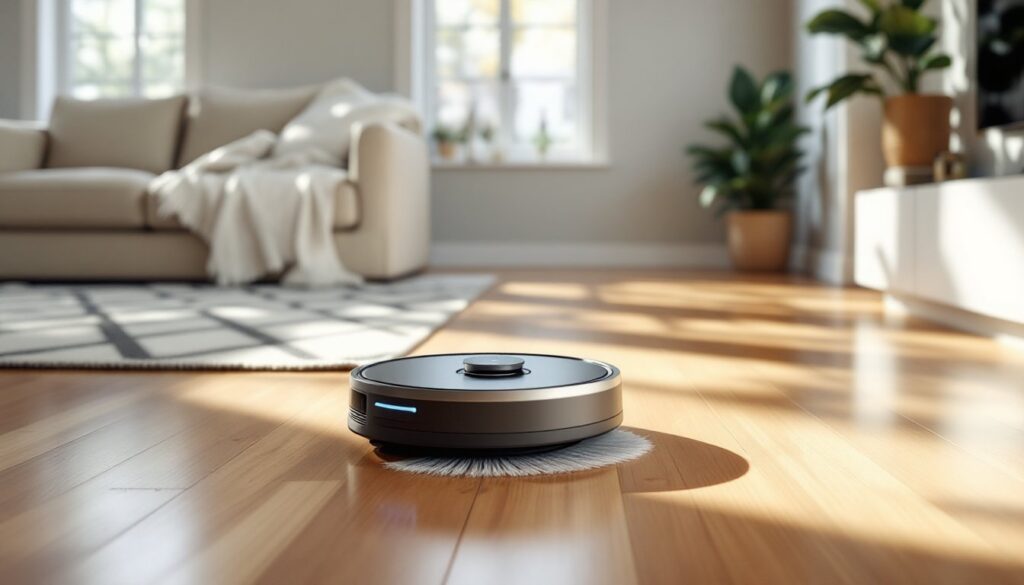
A vacuum and mop robot is a disc-shaped autonomous device that combines suction cleaning with wet mopping in a single unit. Most models measure 13 to 14 inches in diameter and stand about 3 to 4 inches tall, allowing them to slip under furniture and navigate tight spaces.
These machines use onboard sensors, ranging from basic bump sensors to advanced LiDAR mapping systems, to build a mental map of your floor plan. They travel in systematic patterns (usually parallel lines or a grid) rather than bouncing randomly. A motorized brush roll agitates carpet fibers or sweeps hard floors, while a vacuum pulls debris into a dustbin. After the vacuum cycle completes, or sometimes simultaneously, a damp microfiber pad attached to the underside mops hard surfaces.
Most combo units feature separate water tanks for mopping. Some spray water ahead of the cleaning pad: others rely on passive dampening from a reservoir. The best robot vacuum and mop combo models include sensors that detect carpet versus hard flooring, automatically lifting or pausing the mop function to avoid soaking rugs.
A self emptying robot vacuum and mop adds a docking station that sucks debris from the robot’s dustbin into a larger bag or bin, reducing manual emptying to once every 30 to 60 days. Some premium docks also refill the water tank and rinse or dry the mopping pad between runs.
Key Benefits of Adding a Robot Vacuum and Mop to Your Home
The most obvious benefit is time savings. Running a vacuum and mopping a 1,500-square-foot home can take 45 to 60 minutes manually. A robot handles both tasks autonomously, freeing you to work on actual DIY projects or anything else.
Consistency is another advantage. Scheduled daily or every-other-day cleanings prevent dirt buildup, especially important for homes with high-traffic entryways or pets. Many homeowners find they sweep or mop far more frequently once it requires zero effort.
For multiple floors, some models store maps for each level. You carry the unit upstairs, it recognizes the saved map, and resumes cleaning without relearning the layout. This feature appears in mid-range and premium models from leading manufacturers.
Accessibility matters, too. For anyone with mobility limitations or chronic pain, delegating floor cleaning to a robot preserves energy for tasks that truly require human hands. According to recent testing by appliance experts, the best models now rival corded stick vacuums in suction power and outperform traditional string mops in even distribution of moisture.
Finally, these devices excel at hardwood floor robot vacuum duty. Hardwood collects fine dust that dulls the finish over time. Daily robotic vacuuming followed by a damp mop keeps that dust from scratching the surface and helps maintain the wood’s appearance between deep cleans.
Essential Features to Look for When Choosing a Model
Not all vacuum and mop robots deliver the same performance. Focus on these critical features before buying.
Navigation Technology and Smart Mapping
Navigation separates budget models from high performers. Laser-based LiDAR mapping creates precise floor plans, avoiding obstacles and cleaning in efficient straight lines. Camera-based systems (visual SLAM) also work well, though they struggle in low light.
Basic infrared or gyroscopic navigation results in haphazard coverage and frequent collisions. If you have a home with multiple rooms or furniture clusters, invest in a model with smart mapping. You’ll be able to define no-go zones (around pet bowls or floor vents), label rooms, and schedule specific areas for cleaning.
Some units integrate with smart home platforms, allowing voice commands through Alexa or Google Assistant. This isn’t essential but adds convenience when you want to trigger a quick kitchen cleanup after cooking.
Battery Life and Cleaning Coverage
Battery capacity ranges from 2,000 to 5,000+ mAh. Most combo units run 90 to 120 minutes per charge, covering roughly 1,000 to 1,500 square feet. If your home exceeds that, look for models with recharge-and-resume: the robot returns to the dock, tops off the battery, then continues where it left off.
For the best robot vacuum for wood floors, pay attention to suction power (measured in Pascals, or Pa). Hardwood needs 1,500 to 2,000 Pa to lift embedded dust. Carpet requires 2,500 Pa or higher. Adjustable suction lets you dial it down on delicate surfaces or crank it up for high-pile rugs.
Mopping pressure and water flow matter, too. Some pads simply glide over the floor with minimal downward force. Better models use vibrating or rotating pads with adjustable water output to handle sticky spills without oversaturating the floor.
Best Floor Types and Surfaces for Vacuum Mop Robots
Vacuum and mop robots shine on hardwood floors, luxury vinyl plank (LVP), tile, and sealed concrete. These non-porous surfaces tolerate light moisture and benefit from frequent dust removal.
For the best robot vacuum for hardwood floors, confirm the unit has rubber wheels (not hard plastic) to avoid micro-scratches, and verify the mopping system allows you to disable or lift the pad when crossing area rugs. Hardwood should never sit wet: choose a model with precise water metering to leave floors damp, not soaked.
Tile and grout handle more aggressive mopping. Look for models with scrubbing pads or sonic vibration to lift grime from grout lines. Natural stone tile (marble, travertine) requires pH-neutral cleaning solutions, check that your robot’s tank supports third-party cleaners if you need specialty products.
Low-pile and medium-pile carpet work fine for vacuuming, though the mop pad must lift or deactivate. High-pile or shag carpet often tangles brush rolls and reduces suction efficiency. If you have thick rugs, prioritize models with strong suction (2,500+ Pa) and tangle-free rubber brush rolls.
Avoid using any mopping robot on unsealed hardwood, waxed floors, or moisture-sensitive laminates unless the manufacturer explicitly supports it. Water infiltration can warp planks or lift laminate edges, turning a convenience into a costly repair.
For homes with a mix of carpet and hard floors, the best robot mop vacuum combo will automatically detect surface changes and adjust cleaning modes. According to smart home reviewers, premium models now include ultrasonic carpet sensors that react within milliseconds to prevent wet pads from touching fabric.
Maintenance Tips to Keep Your Robot Running Smoothly
Regular upkeep extends the life of your robot and prevents performance drop-off. Plan on spending 5 to 10 minutes per week on basic maintenance.
Empty the dustbin after every run or two, even if it looks half full. Fine dust clogs filters and reduces suction. Self-emptying models still require you to replace or empty the dock’s bag or bin every month or two, depending on home size and debris load.
Wash or replace mopping pads weekly. Most pads are machine-washable: toss them in with towels using warm water and mild detergent. Replace disposable pads per the manufacturer’s schedule, usually every 10 to 15 cleaning cycles. Dirty pads smear grime instead of lifting it.
Clean the brush roll monthly. Hair, string, and pet fur wrap around the roller and bearings. Many units include a cutting tool in the box. Flip the robot over, unlock the brush cover, slice away tangles, and wipe the roller with a damp cloth. Some models use rubber extractors instead of bristle brushes, which resist tangling but still need occasional wiping.
Check sensors and charging contacts every few weeks. Dust on cliff sensors (which prevent stair falls) or camera lenses can cause navigation errors. Wipe them gently with a microfiber cloth. Clean the metal charging contacts on both the robot and dock with a dry cloth to ensure reliable docking.
Replace filters every two to three months. HEPA or foam filters trap allergens but clog over time, forcing the motor to work harder and shortening its lifespan. Replacement filter packs are inexpensive and widely available.
Inspect wheels and side brushes for debris buildup. Small pebbles or hardened dirt can jam wheel axles. Side brushes (the spinning arms that sweep edges) wear down after several months of use: replace them when bristles look flattened or frayed.
Finally, update firmware when prompted. Manufacturers push software updates that improve navigation, add features, or fix bugs. Connectivity to the companion app ensures your robot benefits from these improvements. Reviews on tech-focused sites often highlight how firmware updates have resolved mapping glitches or boosted battery efficiency in popular models.
Store the robot on its dock in a climate-controlled space. Extreme heat or cold can degrade battery cells and warp plastic components. If you won’t use the unit for an extended period (like during a renovation), charge the battery to about 50% and power it off to preserve cell health.